
On this page
Use ChatGPT to turn a messy sales export into a report you can check. You will preserve legitimate refunds, remove duplicate events, resolve a missing cost, verify the calculations in Excel or Google Sheets, and write a short business memo. The downloadable exercise contains original fictional data and a complete answer key.
Documentation checked November 1, 2026. Sample data and worked answers are original teaching material. Calculations and workbook formulas were verified locally. Instructions for ChatGPT, Excel and Sheets follow vendor documentation; this is not a claim of a live account test or an accredited qualification.
Your assignment: explain what September sales actually contributed.
A fictional business sells desk pads and canvas pouches through its website and a marketplace. The owner wants to know which channel and product combinations deserve investigation. The export has duplicate records, cancelled orders, inconsistent channel labels, refunds and one missing item cost.
Your deliverable is a checked account of this sample month. It must show net sales and the amount remaining after item costs, transaction fees and seller-paid shipping. We call that amount operational contribution throughout the exercise. It excludes advertising, overhead, owner labor and taxes, so it does not establish the business’s final profit.
By the end, you should be able to explain why an order can legitimately appear twice, why an unknown cost cannot become zero, and why a higher contribution rate does not prove that moving sales to another channel will improve the business.
- Save the original file and define what each row represents.
- Produce a cleaning log with the IDs and reasons for every exclusion or correction.
- Reconcile the cleaned rows and monetary totals against the answer key.
- Build one chart from the checked summary.
- Write a memo that separates observed amounts, possible explanations and the next information needed.
Start with file upload. A paid AI plan is not a prerequisite.
You need a ChatGPT account with file upload and data-analysis access, plus Excel or Google Sheets for the independent check. You should be able to open a CSV, enter a formula and select a range. No Python knowledge is required; the optional verification script is provided for readers who want a reproducible calculation.
OpenAI’s current Free FAQ includes file uploads and data analysis, each subject to separate limits. If your account reaches a limit, use the spreadsheet exercise while waiting for the reset shown in the product. Do not buy a subscription simply because an older tutorial says Advanced Data Analysis always requires Plus.
| Route | What you need | Cost boundary |
|---|---|---|
| Upload CSV to ChatGPT | An account with the available file and analysis tools. | The exercise can use the Free allowance. Higher limits may require a paid plan. |
| Verify in a spreadsheet | Your existing Excel access or a Google Sheets account. | No AI add-in is needed for the supplied formulas. Any existing software or organizational licensing still applies. |
| Optional official add-in | ChatGPT for Excel or Google Sheets, enabled for your account. | Usage follows your ChatGPT plan’s current limits or credit terms. Installation does not imply unlimited analysis. |
Sources: OpenAI Free Tier FAQ and official Excel and Google Sheets add-ins. Plan access can change.
If you prefer working inside the spreadsheet
For Excel, OpenAI documents Home → Add-ins, search for ChatGPT, then add it and sign in. For Google Sheets, install OpenAI’s ChatGPT listing from the Google Workspace Marketplace, open it from Extensions, and sign in. An organization may require an administrator to enable access. These are optional alternatives to the upload workflow below; neither requires you to build an API integration.
Duplicate the workbook before asking an add-in to edit it. Tell it to preserve the original data and put changes in a new working sheet. OpenAI says spreadsheet conversations are separate from the main ChatGPT chat history, so supply the exercise rules again if you switch surfaces.
Use the fictional file before your own export
The starter file contains no customer names, addresses, emails or payment details. For a real project, use the workspace approved for your business data and remove unnecessary customer fields. In personal ChatGPT settings, review Data controls → Improve the model for everyone. Changing a training preference does not establish permission to upload information your business is required to protect.
Source: OpenAI data controls. This lab does not require customer-level personal information.
One row is an event, not necessarily a new order.
The CSV contains September 2026 events in USD. Dates use YYYY-MM-DD. Amounts are event totals, not per-unit amounts. A sale and a later refund can share an order ID but must have different event IDs. There is one sale event per completed order in this small sample; a real multi-item export may contain several sale lines per order.
| Column | Meaning | Rule for this lab |
|---|---|---|
| A · event_id | Identifier of a sale or refund event. | Deduplicate only after all fields for a repeated ID match. |
| B · order_id | Order associated with the event. | A repeated order ID is not automatically a duplicate. |
| C · event_date | Date the event occurred. | Use the event month, including refund dates. |
| D · event_type | sale or refund. | Preserve both event types. |
| E · order_status | completed or cancelled. | Cancelled rows are uncompleted drafts in this exercise. |
| F · product_sku | PAD or POUCH. | Use this stable key for product grouping. |
| G · product_name | Desk pad or canvas pouch. | A display label; it does not change the key. |
| H · channel | Website or marketplace. | Trim surrounding spaces and convert to lowercase. |
| I · quantity | Units in a sale event. | Refund rows have zero. This is units sold before returns. |
| J · gross_sales_usd | Item sales before discounts or refunds. | Positive for a sale; zero for a refund. |
| K · discounts_usd | Discount amount. | A positive amount to subtract once. |
| L · refunds_usd | Money refunded. | A positive amount to subtract once. |
| M · cogs_usd | Item cost assigned to the event. | A blank is unknown. A numeric zero is known zero. |
| N · payment_fees_usd | Recorded transaction fees. | Use supplied amounts; do not invent a fee rate. |
| O · shipping_cost_usd | Seller-paid shipping cost. | Use supplied amounts; customer shipping revenue is absent. |
Refund policy for this fictional scenario: none of the refunded goods creates a restock credit, fee reversal or recovered shipping cost. The zeros on refund-event cost fields mean there is no additional cost or reversal on those events. Costs from the original sale remain. A refund is not evidence that inventory became sellable again.
Before adapting this to your store, establish your export’s actual sign conventions, tax treatment, shipping revenue, line-item structure, refund timing and inventory adjustments. The supplied metric definitions apply to this exercise, not automatically to every seller platform.
Ask for a profile and an exception list.
Open a new ChatGPT conversation and attach sales-events-dirty.csv. OpenAI recommends clear headers and one record per row; it supports spreadsheet uploads and can run Python calculations for data-analysis tasks. Use the CSV itself rather than a screenshot of the numbers.
Source: OpenAI data-analysis guidance.
Prompt 1: inspect the source
Inspect the attached sales-events-dirty.csv without modifying it.

This is fictional September 2026 event-level sales data in USD. A row is a sale or refund event. event_id is the event key; order_id may legitimately repeat. Amounts are totals for each event, not unit prices. Refund amounts are positive deductions. Refund events do not reverse item costs, fees or shipping in this exercise.

Report:
1. Filename, number of data rows, columns and date range.
2. Counts by event_type and order_status.
3. Repeated event IDs, including whether every field matches.
4. Missing costs and channel labels before normalization.
5. Questions that must be resolved before calculating contribution.

Do not fill blanks, delete records or recommend business changes yet. Show the relevant event IDs and source row numbers. If code execution is unavailable, say so rather than claiming the calculations ran.
Checkpoint: the source has 27 data rows and 15 columns. The repeated event IDs are S003 and R002. Cost is missing on S015. Check the actual rows when the response describes them; a fluent exception list can still omit a problem.
Remove duplicate events. Keep the refund history.
Save the original file unchanged. Work on a copy. Here, both repeated event IDs are exact copies, so keeping their first occurrence is justified. If a repeated ID had different amounts or dates, the correct next step would be to resolve the conflict, not arbitrarily keep the newest row.
Prompt 2: apply the approved rules
Create a separate working dataset and a cleaning log. Apply these rules in order:

1. Remove only later exact duplicates of event_id, after confirming all fields match. Stop and report any conflicting duplicate.
2. Exclude cancelled orders. In this exercise they are uncompleted drafts, with no actual costs.
3. Trim channel whitespace and lowercase the supplied labels. Valid results are website and marketplace. Report any other value.
4. Retain every legitimate sale and refund event. Never deduplicate by order_id.
5. Keep the missing cogs_usd value unknown. Do not infer it from another sale or fill it with zero.
6. Compute net_sales_usd = gross_sales_usd - discounts_usd - refunds_usd.
7. Contribution requires known item cost, fees and shipping. Mark affected contribution results unavailable until the missing cost is confirmed. Do not sum partial contributions and label them complete.

Return row counts at each stage, the excluded event IDs, changes to channel labels, remaining missing values and net sales. Export a cleaning log and the working file. Show the calculation method or code.
Expect 27 raw rows → 25 unique events → 23 retained events. Remove the later copies of S003 and R002, and exclude cancelled events S021 and S022. Keep refund events R001, R002 and R003. Channel spelling changes affect S005, S008 and S017.
You can report net sales before resolving the missing item cost because net sales does not use that field. You cannot report a complete contribution total. Counting the blank as zero would overstate final contribution by $12 once the confirmation below is applied.
Resolve the unknown using a supplied record
Download owner-confirmation.csv and attach it to the same conversation. It is a fictional owner’s confirmation tied to S015, dated October 1, 2026. It documents an item cost of $12.00 for that event and the exercise’s no-reversal refund rule.
Prompt 3: apply a traceable correction
Use owner-confirmation.csv to resolve the missing cost by event_id and field_name. Confirm that the key matches exactly one retained event. Record the old blank, the confirmed value, confirmation date and source in the cleaning log. Do not change any other cost.

Now calculate contribution_usd = net_sales_usd - cogs_usd - payment_fees_usd - shipping_cost_usd. Return totals by channel and by channel plus product_sku, with net sales and contribution. Calculate each contribution rate as grouped contribution divided by grouped net sales; do not average row percentages.

Count distinct completed sale order IDs separately from retained event rows. State the refund policy and the omitted costs. Export the cleaned CSV, summary table and calculation code.
Checkpoint: the corrected file still has 23 rows. A lookup must not multiply rows. In this sample, there are 20 completed orders and 33 units sold before returns. Refund-event quantity is zero, so this dataset cannot tell you net units kept by customers.
Rebuild the totals in Excel or Google Sheets.
Download your cleaned result before closing the conversation. OpenAI’s table documentation shows a download control for CSV output. If the answer does not include a usable file, ask for the CSV explicitly and check its contents after saving.
In desktop Excel, use Data → From Text/CSV and review the comma-separated preview. In Google Sheets, use File → Import → Upload, select the file and import into a new spreadsheet or new sheet. Call the working sheet Clean. Preserve IDs as text and confirm monetary columns contain numeric values. A format that displays two decimals does not convert text into a number.
Import instructions: Microsoft CSV import and Google Sheets file import.
Keep columns A–O in the original order. Put net_sales_usd in P1, contribution_usd in Q1 and cost_status in R1. Enter these formulas in row 2 and fill through row 24, the last of the 23 retained events. These English-language formulas use commas; regional settings may require semicolons.
Spreadsheet formulas for this exercise
Clean!P2 — net sales
=J2-K2-L2

Clean!Q2 — contribution, preserving an unknown cost
=IF(ISNUMBER(M2),P2-M2-N2-O2,"")

Clean!R2 — cost status
=IF(ISNUMBER(M2),"Complete","Cost missing")

Summary: net sales
=SUM(Clean!P2:P24)

Summary: complete contribution only
=IF(COUNT(Clean!M2:M24)<ROWS(Clean!M2:M24),"Cost missing",SUM(Clean!Q2:Q24))

Website net sales
=SUMIFS(Clean!P2:P24,Clean!H2:H24,"website")

Website desk-pad contribution, after all costs are confirmed
=SUMIFS(Clean!Q2:Q24,Clean!H2:H24,"website",Clean!F2:F24,"PAD")

Raw event-ID occurrence counter: put in a spare column, fill rows 2–28
=COUNTIFS($A$2:A2,A2)
The last formula marks a later occurrence with 2, but you still need to compare its full row before deleting it. The contribution guard checks the one known missing-input risk in this exercise. For a real export, validate every required monetary field rather than assuming fees and shipping are complete.
For a visual cross-check, create a pivot table from the corrected Clean!A1:R24 range. Put channel and product_sku in Rows. Put net_sales_usd and contribution_usd in Values, summarized by SUM, not COUNT. Confirm that every group and the grand total agree with the formula summary. Calculate rates from grouped totals outside the pivot.
Function references: Microsoft SUMIFS, Google SUMIFS and Google pivot tables.
Test the guard: in a disposable copy of the supplied workbook, clear Clean!M16, the S015 cost. Review must show “Cost missing” for total contribution. Enter a numeric zero and the total becomes $252.90. Enter 24 and it becomes $228.90. Restore the confirmed 12 to recover $240.90. This demonstrates that unknown, zero and changed values behave differently.
The checked answer is $702 in net sales and $240.90 in contribution.
Try the exercise before comparing your results here. These are independently calculated answers from the supplied fictional records. The downloadable Python verifier uses decimal arithmetic and fixed control totals; it does not ask an AI model whether its own answer looks right.
| Control | Expected result | What it checks |
|---|---|---|
| Source / unique / retained rows | 27 / 25 / 23 | Two duplicate rows and two cancelled drafts removed. |
| Sales / refunds / completed orders | 20 / 3 / 20 | Refunds remain events; they are not new orders. |
| Gross item sales | $804.00 | Eligible sale-event amounts. |
| Discounts / refunds | $34.00 / $68.00 | Each deduction appears once. |
| Net sales | $702.00 | $804 − $34 − $68. |
| Item costs / fees / shipping | $306.00 / $63.10 / $92.00 | Includes the confirmed $12 cost. |
| Operational contribution | $240.90 | $702 − $306 − $63.10 − $92. |
| Contribution / net sales | 34.3% | $240.90 ÷ $702, rounded for display. |
| Channel and product | Net sales | Contribution | Contribution rate |
|---|---|---|---|
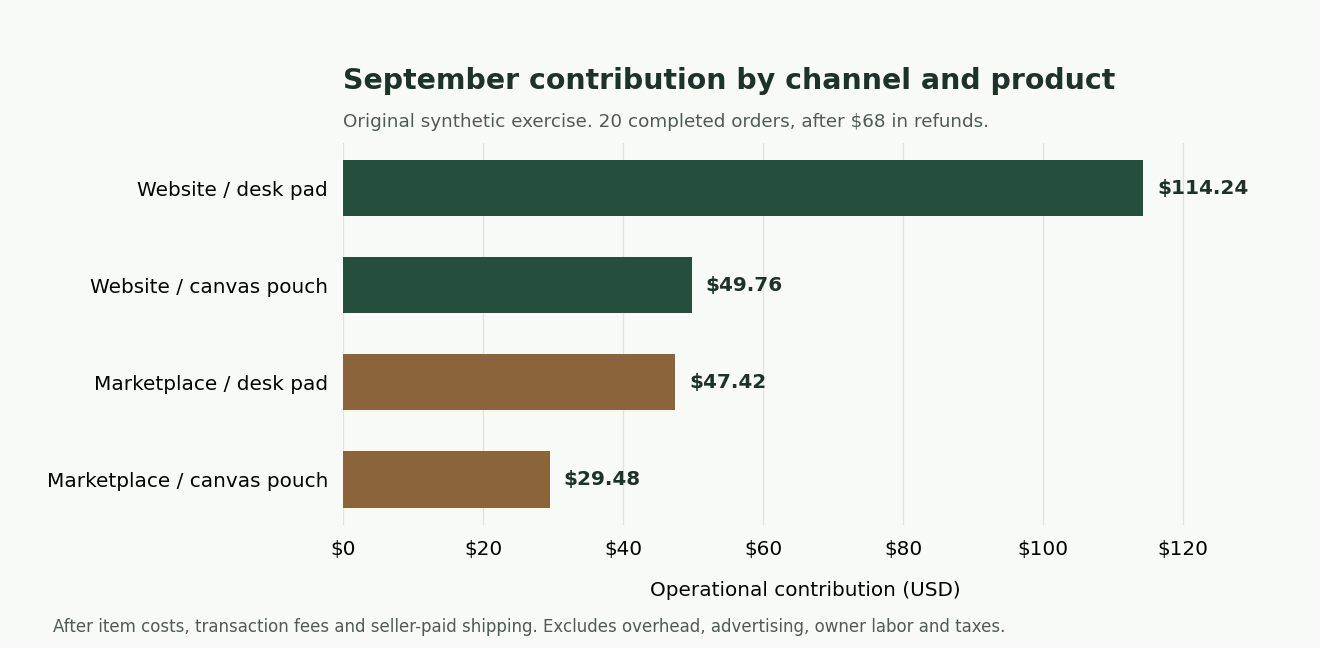
| Website · desk pad | $242.00 | $114.24 | 47.2% |
| Website · canvas pouch | $140.00 | $49.76 | 35.5% |
| Marketplace · desk pad | $184.00 | $47.42 | 25.8% |
| Marketplace · canvas pouch | $136.00 | $29.48 | 21.7% |
| Total | $702.00 | $240.90 | 34.3% |
Inspect order O1003 as a row-level check. Its sale is $32, with $12 item cost, $4.16 fees and $4.50 shipping. Its separate refund is $32. Net sales across the two events are zero, but contribution is −$20.66 because the costs were not reversed. Deleting the refund or reversing costs without evidence would tell a different story.
Download the formula workbook Download the machine-readable answer key
Build one useful chart, then write a memo that respects the evidence.
A horizontal bar chart makes four contribution amounts easy to compare. Start its value axis at zero, show USD and label each bar. Do not combine percentages and dollars on one unlabeled scale or use a decorative chart that hides the group names.
Prompt 4: chart and decision memo
Use the reconciled channel-and-product summary only.

Create a horizontal bar chart of operational contribution in USD for all four groups. Start the value axis at zero and label each amount. Title it September contribution by channel and product. Mark the data as fictional and list the costs excluded from the metric. Export the chart and its underlying table.

Write a 150–200-word owner memo with:
- Two observations tied to exact checked figures.
- One plausible explanation clearly labeled as a hypothesis.
- One specific next investigation, including the missing data needed.
- A decision we should not make from this sample alone.

Do not claim causation, forecast growth, calculate conversion without visitor data, or describe contribution as final business profit. There is only one small synthetic month and no advertising, overhead, labor or tax data.
Worked memo
September’s fictional sales produced $702 in net sales and $240.90 in operational contribution after item costs, transaction fees and seller-paid shipping. The website contributed $164 on $382 in net sales. The marketplace contributed $76.90 on $320. Website desk pads were the largest contribution group at $114.24; marketplace pouches were the smallest at $29.48.
A possible explanation for the channel difference is the mix of recorded fees and refunds. Marketplace fees total $48.10 compared with $15 on the website, and marketplace refunds total $50 compared with $18. These are observations from this sample, not proof that channel choice caused the difference.
Next, reconcile the three refunds to their documented reasons and collect channel-specific advertising costs and comparable prior months. That would help distinguish an unusual refund month from a recurring cost problem. I would not close the marketplace or move advertising budget based on this file alone. The sample contains only 20 completed orders and excludes overhead, advertising, owner labor and taxes. It also lacks visitor data, so it cannot establish which channel converts better.
If your result differs, trace the difference to a rule.
| Symptom | Check first | Repair |
|---|---|---|
| Refunds disappear | Was order_id used as the duplicate key? | Restart from the original. Deduplicate exact event IDs and retain refund events. |
| Contribution is $252.90 | Was S015’s missing cost treated as zero? | Apply its documented $12 confirmation and retain the missing-cost guard. |
| Too many channel groups | Are spaces and capitalization still present? | Normalize the three identified channel labels and regroup. |
| Summary shows counts instead of dollars | Are amounts imported as text? Is the pivot using COUNT? | Correct numeric types, then select SUM. |
| A refund appears twice | Did both R002 copies survive? | Compare the exact duplicate rows and remove the later copy. |
| Total contribution looks complete despite a blank | Did SUM silently skip an unavailable row? | Check required cost coverage before presenting the total. |
| SUMIFS returns an error | Do its sum and criteria ranges cover identical rows? | Use aligned ranges through row 24 and confirm your locale’s separators. |
| ChatGPT cannot analyze the file | Tool limit, attachment failure or wrong file? | Verify the filename and row count. Use the supplied spreadsheet route; do not accept a claimed run without an output. |
If a difference remains, ask for the event-level amounts behind that specific total. “Show the rows contributing to marketplace refunds” is easier to audit than “check everything again.” Preserve the problematic output and corrected version so the next run has a visible explanation.
Assess the finished work against observable requirements.
Submit the original file, cleaned CSV, cleaning log, checked summary, chart and memo. This is a practice rubric, not a certification. A passing exercise needs all five requirements below; a polished memo cannot compensate for lost refunds or an invented cost.
| Skill | Required evidence | Pass condition |
|---|---|---|
| Data definition | Written event/order distinction and field meanings. | Correct units, date window and refund sign convention. |
| Cleaning judgment | ID-level log and unchanged original. | 27 → 25 → 23 rows; three refunds preserved; no invented cost. |
| Numerical verification | Spreadsheet formulas or executed verifier. | All control totals match to the cent; missing, zero and changed costs behave correctly. |
| Communication | Chart and 150–200-word memo. | Chart matches the table; every numeric claim is traceable; hypotheses are labeled. |
| Business judgment | Next investigation and limits. | No causal claim, unsupported forecast, conversion claim or final-profit claim. |
Transfer exercise: repeat the workflow on a permission-approved, limited export from your business. Write its dictionary first. Document differences in taxes, order lines, refunds, shipping income and cost reversals. A successful transfer means adapting the definitions and controls to that source, not forcing a different export into these exact answers.
Download the full working set.
Download the complete exercise ZIP
- Starter sales-events-dirty.csv — the untouched exercise.
- Owner confirmation — the missing-cost resolution.
- Prompts and formulas — copyable instructions from this lesson.
- Corrected event file and cleaning log — compare after your attempt.
- Formula workbook — Review, Clean and original Raw sheets.
- Answer key and Python verifier — reproducible controls using the neighboring CSV files.
The CSVs are portable to Excel and Sheets. Keep all CSVs and the Python script in the same folder if you use the verifier, then run python verify_sales_analysis.py. The supplied workbook was recalculated and checked in its authoring engine; opening it in your own Excel or Sheets environment is still part of the exercise.
Common ChatGPT and Excel questions
Can AI analyze my Excel spreadsheet?
ChatGPT supports common spreadsheet formats, including XLSX and CSV, when the available account tools permit. Give it the file, a field dictionary and the decision you need to support. Confirm which rows and sheets it actually used. This lab starts with CSV because the row structure and calculation inputs are easy to inspect.
Which ChatGPT model is best for Excel?
There is no comparative model test in this lesson. Start with a model or mode that can access the required analysis tools on your account. Assess its output against the same control totals, refund case and missing-cost test. A model name or higher-priced plan does not verify an answer.
What are good ChatGPT prompts for Excel data analysis?
Use the four staged prompts above: inspect, apply approved cleaning rules, resolve the documented correction, then communicate checked results. For your own file, replace the field definitions, period, valid categories and exclusions. Those details carry more information than asking ChatGPT to “act like an expert.”
Do I need an API key or a third-party Excel extension?
No for this upload-and-verify workflow. The optional official OpenAI add-in is a separate route with its own installation and plan usage terms. Older guides may describe third-party products or an earlier interface; follow the current vendor instructions linked above.
Can this predict next month’s sales?
This exercise does not support that claim. It contains one small fictional month and no traffic, promotion or inventory history. It teaches you to establish reliable descriptive numbers first and identify the additional evidence a forecasting project would require.
Evidence and teaching scope
I built this lesson around an issue that a generic “analyze my spreadsheet” prompt leaves unresolved: who decides what a duplicate, refund or unknown cost means? The rules, sample data, calculation checks, chart and memo are original teaching material. They can be inspected and reproduced. The screenshots are clearly credited vendor examples.
The lesson’s product instructions use current OpenAI, Microsoft and Google documentation. Its arithmetic was calculated with Python decimal values and checked against an XLSX formula model, including missing-cost and zero-cost cases. It does not report customer results, vendor-account execution, course accreditation or a measured improvement in learner performance.
Continue with the product profit check when you need to define additional business costs, or use the business brief workflow to preserve approved definitions for a recurring task. For access and plan comparisons, see AI assistants for small business.
Before you rely on this workflow
Work through these checks in your own account. Marking a box records your progress; it does not verify the setup for you.
0 of 5 checks completed
With JavaScript enabled, checkmarks can stay in this browser. Download the kit for a portable copy.
Updated 2026-11-01: New original practice lab with a deliberately messy sales export, independent answer key, formula workbook, vendor screenshots, troubleshooting, and an assessed business memo.